
Mercury Lets ChatGPT and Claude Queue Payments. Approve in Mercury First.
Mercury MCP write tools (Oct 15) let ChatGPT and Claude queue payments. Money moves only after Mercury approve. Six ledger lines before you tap Approve.
Jonathan Kvarfordt · Published October 15, 2026 · Last updated October 15, 2026 · 6 min read
On October 15, 2026, Mercury released write actions for its Model Context Protocol (MCP) connection so ChatGPT, Claude and other supported AI tools can request payments, internal transfers and category changes on a Mercury account. (Mercury release notes)
Payments and transfers still move only after a human approves them in Mercury. A confirmation in the chat is not that approval. Category and note edits apply immediately, with no Mercury approval queue.
What shipped
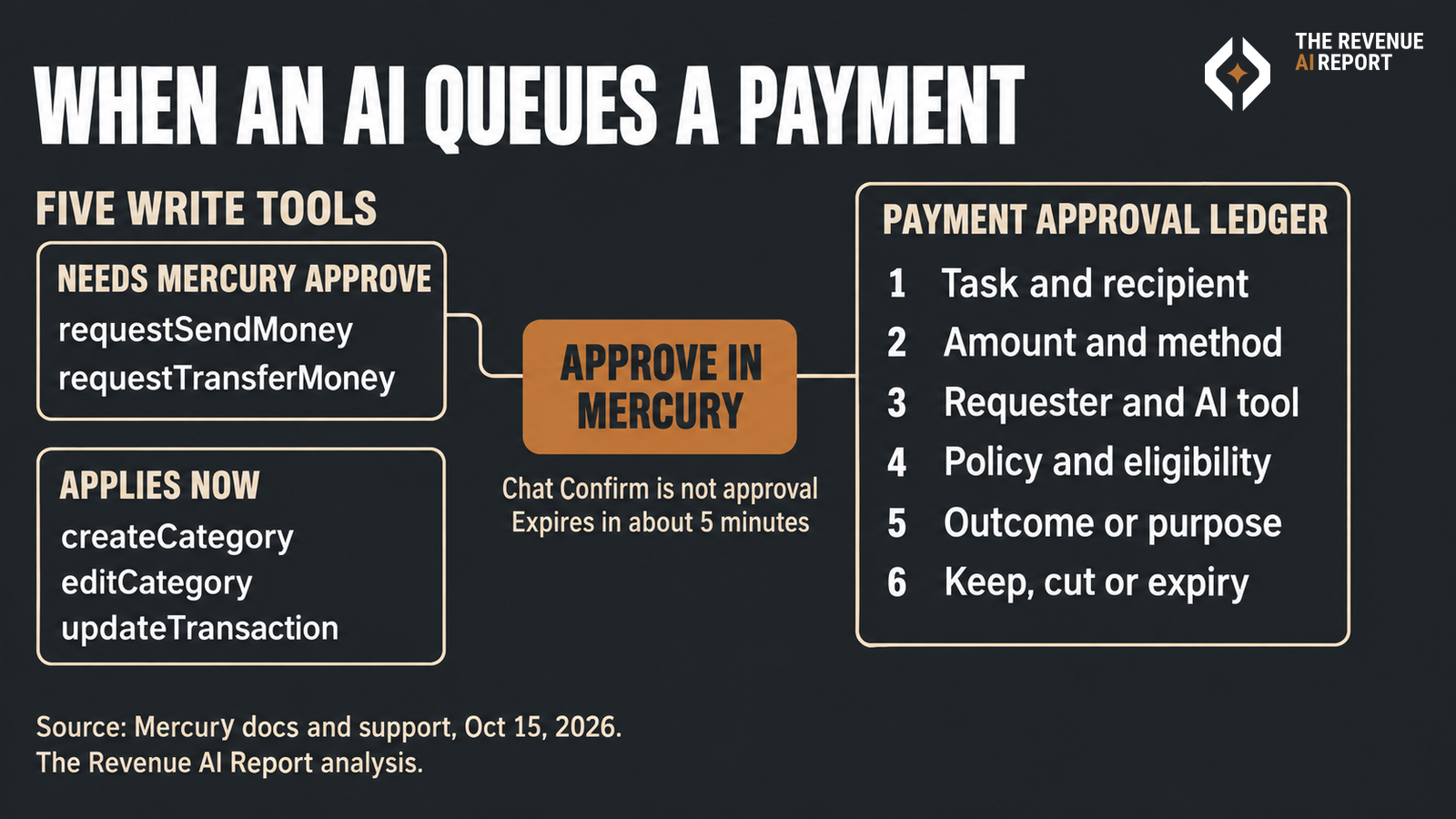
Mercury's docs list five write tools (supported tools):
- `requestSendMoney`: queues a payment to an existing recipient. Needs approval in Mercury before money is sent.
- `requestTransferMoney`: queues a transfer between your own Mercury accounts. Needs approval in Mercury before money moves.
- `createCategory`: creates a custom expense category immediately. No separate Mercury approval.
- `editCategory`: updates a custom expense category immediately. No separate Mercury approval.
- `updateTransaction`: updates or clears a transaction's note or category immediately. No separate Mercury approval.
Existing read-only connections must reauthorize before these write tools work. Mercury's support article also states that AI tools cannot add new recipients: you can only request payments to recipients already in Mercury. (Connecting Mercury to AI tools)
Chat Confirm is not Mercury Approve
Mercury's support page is explicit: selecting Confirm Request in the AI tool does not authorize the payment. You still open Mercury, find the request under Needs approval in Tasks or Payments, and approve or decline there.
Approval requests expire after approximately five minutes. If one expires, you start again from the AI tool.
Mercury's docs add that your organization's approval policies still apply. If those policies would otherwise skip an approval step, the requester must still approve the request in Mercury. The AI tool cannot approve the request or move money on its own. "Request created" does not mean "payment sent."
The six-line payment approval ledger
Before anyone taps Approve in Mercury, put these six lines on the request. One row per payment or transfer.
- Task and recipient. What the payment is for, and which existing recipient or destination account is named. If the recipient is new, stop: add them in Mercury first, outside the AI tool.
- Amount and method. The dollar amount, the payment method, and the timing Mercury shows.
- Requester and AI tool. Who asked, which AI client queued it (ChatGPT, Claude, Cursor or another supported MCP client), and which Mercury user will approve.
- Policy and eligibility. Whether the amount sits inside the org's approval policy, and whether the approver is an eligible approver for that request.
- Outcome or purpose. The business reason in one line a CFO or RevOps lead can audit later (vendor invoice, partner payout, internal float move).
- Keep, cut or expiry. Approve, decline, or let the ~5 minute window expire and restart with a corrected request.
Who owns which line
- CFO or finance ops: owns lines 2, 4 and 6. Money leaves only after Mercury Approve, and the receipt has to match policy.
- RevOps or GTM ops: owns lines 1, 3 and 5 when the payment is a vendor, partner or campaign cost that sits next to revenue work.
- CRO or founder on Mercury: sets which AI tools may connect, which users may request, and who is an eligible approver.
- Anyone connecting an AI tool: treats category and note edits as live edits. They skip the approval queue, so a wrong category can overwrite a correct one without a second look.
This is the same receipt pattern whether you run payments for a manufacturer, an insurer, a regional bank, a hospital system or a software company. The bank product is Mercury; the ledger is for the humans who still have to tap Approve.
What to do this week
- List every AI tool connected to Mercury in your org, and confirm each one reauthorized after the Oct 15 write tools shipped.
- Confirm no workflow assumes chat Confirm equals bank approval.
- Add the six ledger lines to your Mercury approval checklist for `requestSendMoney` and `requestTransferMoney`.
- Decide who may create or edit categories through AI, since those changes apply now.
Related
- Accenture's $29 Claude Allowance: A Six-Line Ledger Before You Approve Overage
- AI Credit Index: Price the Task, Not the Credit
- Sales AI Just Moved Into ChatGPT and Claude. What Can It Read, Write, and Prove?
- Who Audits the Meter on Our AI Agents?
- Reversal Ledger
Sources
- Mercury release notes, "Take action on your Mercury account from ChatGPT and Claude," Oct 15, 2026: mercury.com/releases
- Mercury Support, "Connecting Mercury to ChatGPT, Claude, and other AI tools": support.mercury.com
- Mercury docs, "Supported tools on Mercury's MCP": docs.mercury.com
If you want the next bank or agent payment control checked the same way, subscribe.
Frequently asked questions
- What did Mercury ship on October 15, 2026?
- Write actions on Mercury MCP so ChatGPT, Claude and other supported AI tools can request payments, internal transfers and category changes. Payments and transfers still need approval in Mercury before money moves.
- Does confirming in ChatGPT or Claude send the money?
- No. Mercury states that selecting Confirm Request in the AI tool does not authorize the payment. You must approve the request in Mercury.
- Which write tools need Mercury approval?
- requestSendMoney and requestTransferMoney require approval in Mercury. createCategory, editCategory and updateTransaction apply immediately with no separate Mercury approval.
- Can an AI tool add a new payment recipient?
- No. Mercury says you can only request payments to recipients already added in Mercury. Add a new recipient in Mercury first.
Hiring for revenue roles?
Post your sales, marketing, RevOps or enablement opening where revenue leaders read every week. One 30-day post is $199. Three featured posts are $299/mo.
Keep reading
Reality Check
ChatGPT Ads Added Measurement. Price the Spend You Can't Measure Yet.
ChatGPT Ads added measurement partners, a redesigned Conversions page and visual ad tests while advertisers report mixed results. A six-line order form for B2B pipeline spend you can't measure yet.
Reality Check
The dashboard was green. The answer was wrong.
Most teams judge an AI assistant by whether it is up and fast. Those checks confirm the tool responded and leave the accuracy of the answer untested. AWS recently published a clear example of the gap, from its own sales tools.